Here's an overview of the ARK instrument folder structure:
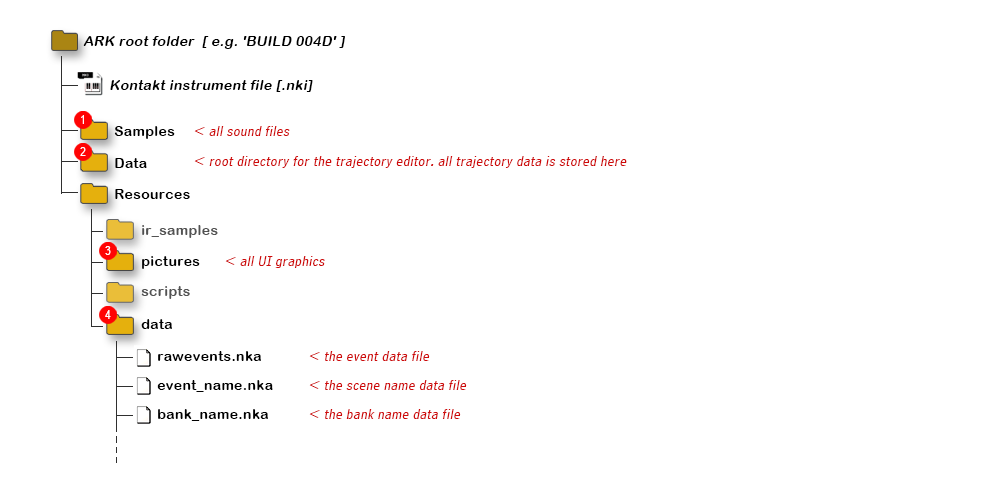
There are four folders of special significance:
The Samples folder holds all sound files. The audio format is: stereo WAV [PCR] @ 96 kHz/24bit.
The file names are fixed and named in reference to the sound's layer, scene and bank number:
< bank no. >{dash}< scene no. >< layer >.wav
The bank number is a single digit, the scene number is always two digits, and the layer is labelled either 'A' or 'B'.
For example, the filename for the 'A' layer sound in Scene 8, Bank 3 would be 3-08A.wav
Likewise, the filename for the layer 'B' sound in Scene 1, Bank 7 would be 7-01B.wav
The Resources / data folder holds the event data and scene names. These files are loaded into Kontakt at startup.
The Kontakt data file format is a standard Unix text file with the extension .nka
Please note that the line breaks in the file must be of Unix [LF] type. Windows/DOS line breaks [CR+LF] or Mac Classic [CR] will break the file!
Also: All .nka files must end with a single empty line due to a bug in Kontakt's file handling code.
ARK uses two separate files to store the event data - one for all the numbers and one for the scene names. Both are stored in this folder.
• rawevents.nka - contains all numerical event data
• event_name.nka - contains the list of all scene names
These two files can be generated by the CSV converter tool, and a new setup is activated simply by replacing the two existing files with the new.
The Resources / pictures folder holds all graphic image files for the UI.
The file format is: .png - with transparency supported.
For each image file, there's a corresponding data file with UI information.
The data file must have exactly the same name as the image file, but with the .txt extension.
The image file name can be freely set following normal Unix file name rules.
The data (.txt) file must end with a single empty line due to a bug in Kontakt's file handling code.
Detailed information on the image data files can be found in section 5.4 (p.32) of the Kontakt 4 Player Developer Guide.
Information about UI controls and their possible settings can be found in the KSP Reference Manual.
The Data folder holds all trajectory data files. These files are used by the trajectory editor in 'load' mode.
These files are of the same type as the event data, i.e. a standard Unix text file with the extension .nka
Please note that the line breaks in the file must be of Unix [LF] type. Windows/DOS line breaks [CR+LF] or Mac Classic [CR] will break the file!
Also: All .nka files must end with a single empty line due to a bug in Kontakt's file handling code.